 By Jared White · Executive MBA, AI for Business Certified
Who has to pay quarterly estimated taxes
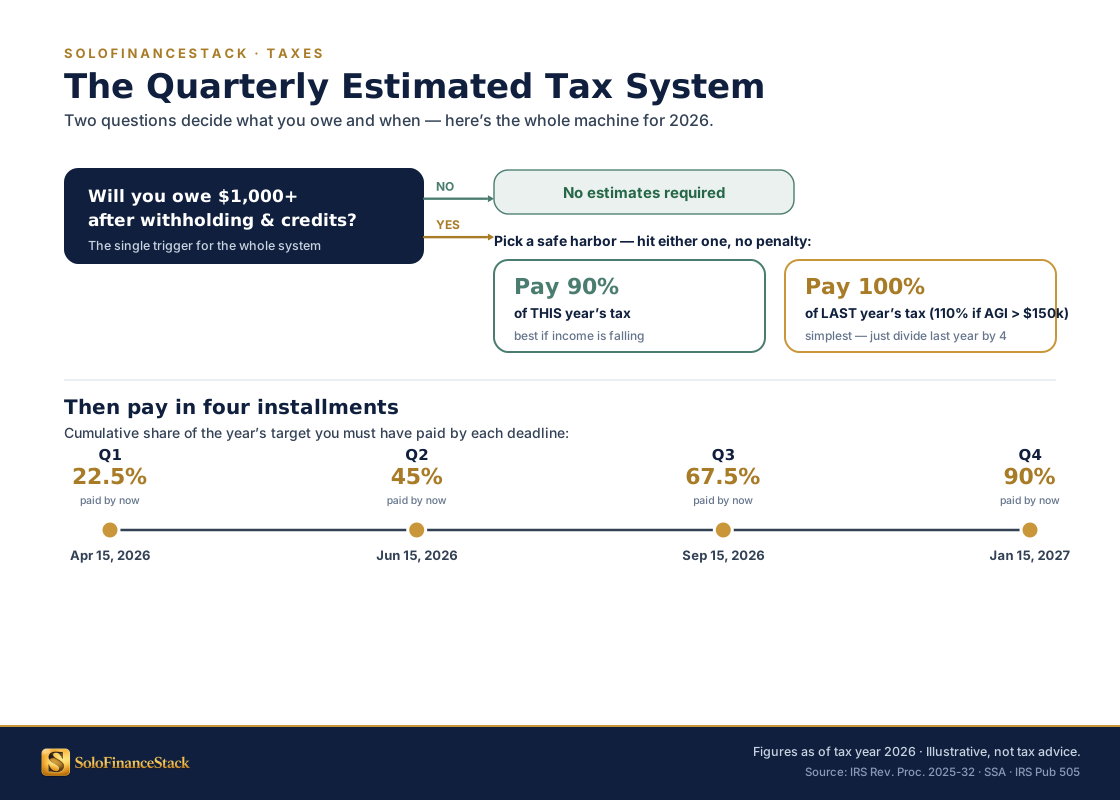
The IRS requires quarterly estimated tax payments from anyone who expects to owe $1,000 or more in federal taxes after accounting for withholding and credits. For full-time freelancers and consultants — who have no employer withholding — this threshold is crossed almost universally once you have meaningful income.
Specifically, you must make quarterly payments if:
- You expect to owe at least $1,000 in federal tax after subtracting any withholding
- Your withholding and credits will cover less than 90% of your current-year tax liability, or less than 100% of last year's tax liability
If you also have a part-time W-2 job with significant withholding, that withholding may cover enough of your total tax bill that quarterly payments aren't required. The IRS withholding calculator at IRS.gov can tell you where you stand.
2026 quarterly deadlines
The IRS uses a non-intuitive quarterly schedule. Q2 covers only two months (April–May), while Q1, Q3, and Q4 each cover three months. This asymmetry catches people every year.
| Quarter | Income Covered | Due Date | Months Covered |
|---|---|---|---|
| Q1 2026 | January – March | April 15, 2026 | 3 months |
| Q2 2026 | April – May | June 16, 2026 | 2 months ⚠️ |
| Q3 2026 | June – August | September 15, 2026 | 3 months |
| Q4 2026 | September – December | January 15, 2027 | 4 months |
Deadlines shift when they fall on weekends or federal holidays. Verify at IRS.gov each year. State estimated tax deadlines are often the same but check your state — some differ.
How to calculate what you owe
There are two methods. Most solo operators should understand both and use whichever results in smaller, more predictable payments.
Pay 100% of your prior year's total tax liability in four equal installments. If your prior-year adjusted gross income (AGI) exceeded $150,000, pay 110% instead. This completely eliminates underpayment penalties — even if you end up owing more at filing because your income grew.
Example: You paid $18,000 in total federal tax in 2025. Divide by 4: pay $4,500 per quarter in 2026. Even if you earn significantly more in 2026 and owe $28,000, there's no underpayment penalty because you met the safe harbor threshold.
Best for: Growing income years. If your business is expanding, safe harbor locks in a known payment amount and protects you from penalties regardless of how well the year goes.
Estimate your current year's net profit, calculate the tax owed on that amount, and pay 90% of it across four quarterly installments. This requires knowing your actual income and expenses each quarter — which means your accounting needs to be current.
Example: You expect $120,000 in net profit in 2026. Estimated tax (SE tax + income tax) might be approximately $36,000. Pay 90% = $32,400 total, or $8,100 per quarter.
Best for: Years where income is lower than the prior year, or when you want your payments to closely match actual liability and minimize overpayment.
If you're newer to self-employment or your income is growing: use the safe harbor method. You know exactly what you'll pay, you'll never owe a penalty, and you can budget with certainty.
If your income dropped significantly from last year: the current-year method avoids overpaying. Run the numbers both ways and pick the lower of the two — as long as you clear 90% of current liability, you're protected.
Ask your CPA which method they recommend given your specific situation. The math changes significantly with S-Corp elections, spouse income, investment income, and deductions.
Understanding self-employment tax specifically
Self-employment (SE) tax is separate from income tax and trips up many first-year freelancers. Here's how it works:
The calculation: multiply your net self-employment profit by 92.35% (to account for the employer-equivalent deduction), then multiply that by 15.3%. The result is your SE tax. You can then deduct 50% of that SE tax when calculating your adjusted gross income — a meaningful offset that reduces your income tax bill.
How to actually pay the IRS
There are three ways to pay quarterly estimated taxes. Direct Pay is the fastest and has no fees.
Whichever method you use: keep confirmation numbers. Take a screenshot or save the email. If the IRS ever questions a payment, your confirmation number is your proof.
State estimated taxes — don't forget them
Most states with income taxes also require quarterly estimated payments on the same or similar schedule. The process is identical — most state revenue departments have their own online payment portals equivalent to IRS Direct Pay.
States without income tax (and therefore no quarterly estimated tax requirement): Alaska, Florida, Nevada, New Hampshire, South Dakota, Tennessee, Texas, Washington, Wyoming. If you're in one of these states, you only have the federal obligation.
For all other states: search "[your state] estimated tax payments" to find your state's payment portal and confirm deadlines — they're often the same as federal but not always.
Building the system so you never scramble
The quarterly tax problem isn't a math problem — it's a cash flow problem. Money comes in, mixes with operating funds, and the tax portion disappears into expenses before the deadline arrives. The fix is structural.
What happens if you underpay or miss a deadline
Missing a quarterly deadline or underpaying doesn't trigger a notice or audit — the IRS calculates the underpayment penalty automatically when you file your annual return and adds it to any balance owed.
The penalty rate is the federal short-term interest rate plus 3 percentage points, applied to the underpaid amount for the period it was underpaid. In 2026, this works out to approximately 7–8% annualized. On a $5,000 underpayment for a quarter, that's roughly $90–100.
It's not catastrophic, but it's also entirely avoidable. The safe harbor method eliminates the risk entirely by anchoring payments to a known prior-year number rather than trying to project current-year income accurately.
Tools that help
For tracking income and calculating estimates: FreshBooks and QuickBooks both sync with your bank, categorize income and expenses automatically, and produce P&L reports that give you the net profit number you need for quarterly calculations. FreshBooks is the better fit for service businesses billing by time or project; QuickBooks is the standard for S-Corps and businesses with more complex accounting needs.
For the tax account itself: Relay is the most practical choice — free, supports up to 20 sub-accounts, and has automatic percentage-based transfer rules that fund your tax account on every deposit without manual action. The FreshBooks and QuickBooks integrations mean your tax account balance appears directly in your accounting software alongside your operating accounts.